SkimPath Canvas
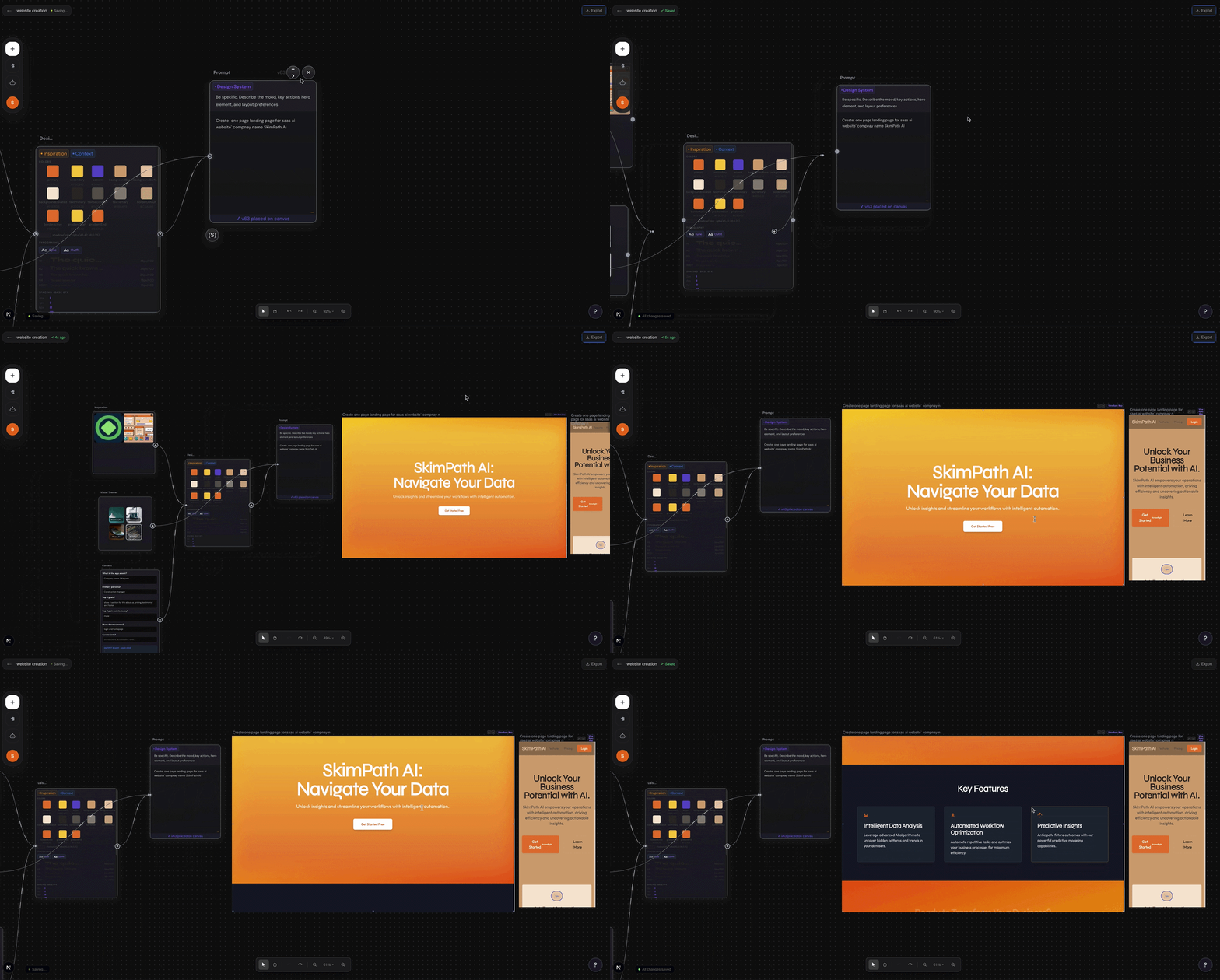
A node-based canvas where one designer becomes PM, engineer, and creative director — powered by AI, built for real products
The problem isn’t ideation. It’s the gap between thinking and building.
I started from my own frustration as a designer who codes. Figma is great for screens but blind to logic. Cursor is great for code but starts too late. AI tools like v0 or Vercel ship components, but they have no memory of your vision from one prompt to the next. Every handoff — from moodboard to wireframe, wireframe to prototype, prototype to code — is a context reset.
The question I kept coming back to: what if the canvas knew everything?
“Most tools start after the idea. SkimPath starts where you actually start — with a feeling, a reference, and a vision.”
I conducted informal research with 8 solo designers and PMs across Figma communities and Twitter. The consistent signal: the pain was not any one tool failing — it was the cost of switching between them. Every switch meant re-explaining context, re-establishing visual language, losing momentum.
The real problem is not tooling. It is the absence of a shared memory across the creative stack.
After synthesis I landed on three core tensions that the product needed to resolve:
Designers think in feelings. AI needs structured prompts. The canvas had to bridge this without making designers feel like they were writing code.
Solo builders want fast output. But fast AI output without constraint produces generic results. The system needed opinionated defaults without removing creative control.
The canvas had to be deep enough for a senior engineer to respect but approachable enough for a non-technical PM to ship with confidently.
AI-generated UI is impressive in demos and fragile in practice. Users needed to feel in control of the output, not at the mercy of it.
The design principle I wrote to anchor the product: The canvas should feel like an extension of your thinking, not a replacement for it.
Three concepts explored before landing on the node-based model.
-
1Chat-first builderA conversation interface that generated screens sequentially. Fast to prototype, but users lost spatial context immediately — they had no mental model of the product as a whole. Killed after two sessions. The problem with chat-first design tools is that product thinking is non-linear.
-
2Template grid launcherA gallery of pre-built AI flow templates (onboarding, chatbot, form) that users could remix. High discoverability, low expression. Users kept hitting the ceiling of what the templates allowed. It felt like a Wix for AI flows — approachable but not powerful.
-
3Node-based canvas ✔Each node is a screen. Each screen has its own AI prompt. Nodes connect like a prototype. The canvas gives spatial context; the prompts give generative power. This model let users think in flows and generate in context simultaneously. It survived testing because it gave users a map of their own thinking.
The hardest engineering problem was also the most important UX problem: live rendering inside a sandboxed iframe.
To show AI-generated React components live inside canvas nodes, I had to build a sandboxed iframe system
(buildSrcDoc.ts)
that compiled JSX in the browser, resolved React version conflicts, blocked navigation events from leaking out
of the node, and posted hover coordinates back to the parent canvas for element inspection.
Three cascading failures I had to solve in sequence:
- React version mismatch — generated code assumed React 18 APIs; the CDN-loaded version was 17. Resolved by pinning the CDN import and injecting compatibility shims via srcdoc.
- Navigation escape — clicking any link or button inside a generated component navigated the iframe away from the srcdoc, destroying the output. Fixed by injecting a nav-blocking script that intercepts all clicks and form submits before they propagate.
- Coordinate mapping — the hover element inspector posted coordinates in iframe-local
space; the canvas needed parent-local space for overlay positioning. Solved with a
useIframeHoverhook that transforms coordinates usinggetBoundingClientRect()on the iframe wrapper.
“The iframe was not just a technical container. It was a trust surface. If the preview glitched, the user stopped trusting the canvas. Reliability of the render loop was a design requirement, not just an engineering one.”
On the AI side, the generation prompt was the most-iterated artifact in the project. Early versions produced plausible-looking but structurally brittle components. The prompt evolved to enforce: named exports only, Tailwind classes only, no external imports, defensive null checks, and a consistent component signature the render loop could always predict.
The product worked technically. The UX failed emotionally.
Early testing sessions with 5 designers and 3 PMs surfaced a consistent pattern: users generated output fast, loved the first result, then felt lost. The node canvas gave them a map but no guide. They didn’t know:
- How to prompt well enough to get useful output
- Whether to edit the generated component or re-prompt it
- How to recover when a node produced something broken
- What the “right” workflow was from canvas to shipped product
This led to a critical design reframe: the canvas was solving the wrong problem. Users did not struggle with generating UI. They struggled with making decisions about what they were building. SkimPath needed to be less of a generation engine and more of a thinking surface that happened to generate.
Key interaction changes made after testing:
- Added a “component from library” entry point alongside scratch generation — giving users an anchor before prompting
- Introduced node-level prompt history so users could compare iterations without losing the thread
- Added canvas-level context (project description, target user, design system tokens) that prefilled the system prompt on every generation call
Mid-build, the product strategy shifted — and it was the right call.
After six months on the canvas builder, I identified a deeper, more defensible problem: every time a designer moves between tools, they re-explain their brand from scratch. The canvas was solving output. The real opportunity was solving memory.
The pivot direction: reposition SkimPath as a portable brand brain — an MCP server and standalone app that stores both hard brand tokens (colors, type, spacing) and soft brand identity (tone, aesthetic philosophy, reference examples) and travels with the designer across every tool they use.
Instead of replacing Figma, Cursor, or v0, SkimPath becomes the context layer that makes all of them brand-aware. The designer configures their brand once. Every AI tool they use draws from that brain automatically.
This pivot is still in progress. The canvas remains a live testbed for the generation patterns that will feed into the brand brain system.
What I would do differently.
Start with the workflow, not the feature. I built the canvas because I wanted it to exist. That is a fine reason to start, but it is not a validated reason to ship. The prompt that should have come first was not “how do I generate UI on a canvas?” but “what is the one moment in a designer's day that is most broken?”
The best design decisions in this project were the constraints. Enforcing named exports, Tailwind-only styling, and no external imports in the generation prompt was not just an engineering choice — it was a design system decision. It made the output predictable, composable, and trustworthy. Constraints are not the enemy of creativity in AI-generated systems; they are the precondition for it.
Pivoting is not failure — premature commitment is. The canvas taught me what the real product should be. Six months of building a tool that “didn’t work” produced the insight that led to a more defensible, more useful product direction. That is not a detour. That is discovery.